
Connect ChatGPT
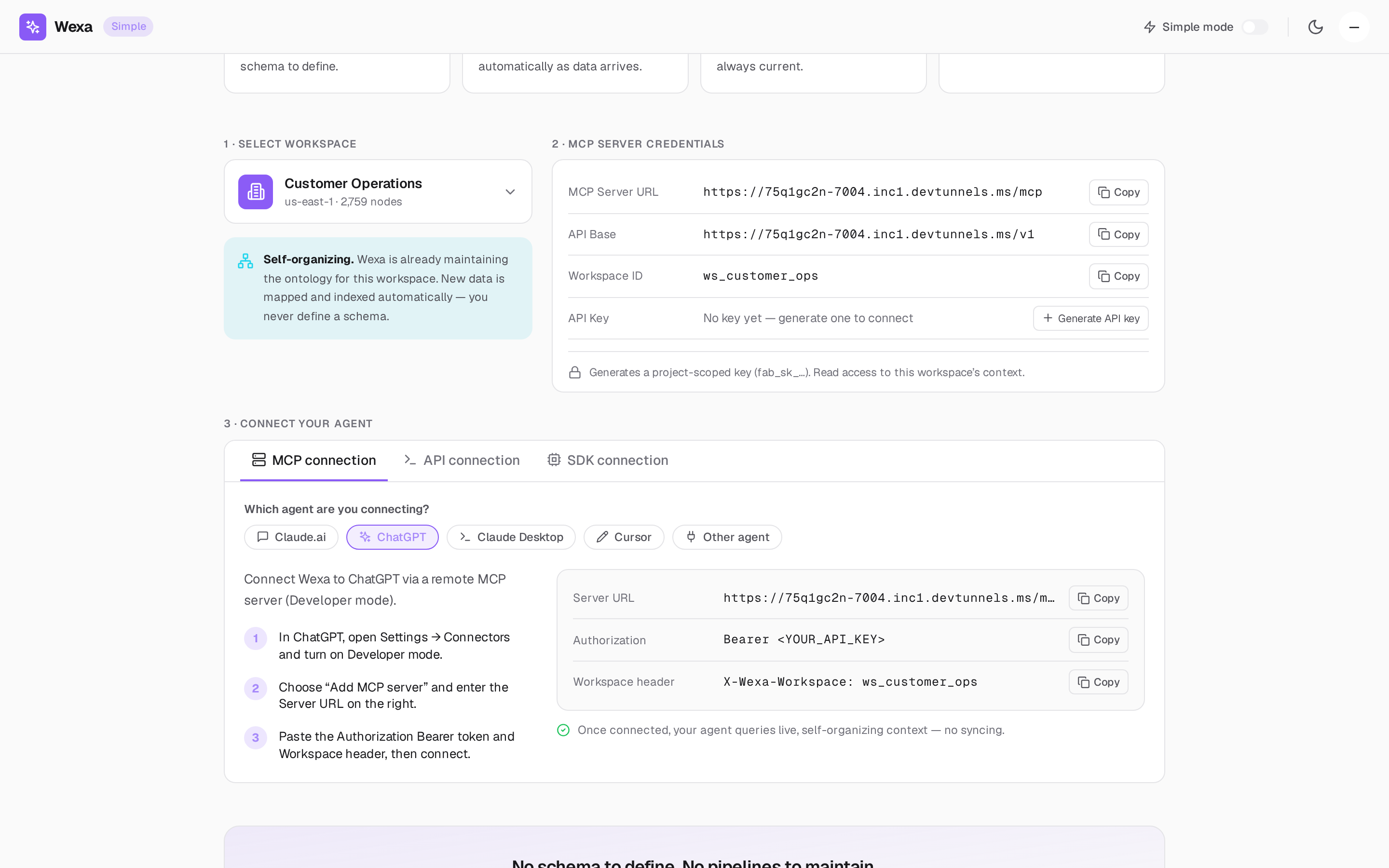
Connect Wexa to ChatGPT via a remote MCP server using Developer mode.
First, get your MCP credentials: your MCP Server URL,
workspace ID (ws_<your_project>), and an API key (fab_sk_…).
- In ChatGPT, open Settings → Connectors and turn on Developer mode.
- Choose Add MCP server and enter the Server URL from your console.
- Paste the Authorization
Bearertoken and the Workspace header, then connect.
The values to enter:
| Field | Value |
|---|---|
| Server URL | https://mcp.wexa.ai/v1/sse |
| Authorization | Bearer <YOUR_API_KEY> |
| Workspace header | X-Wexa-Workspace: ws_<your_project> |
Verify the connection
Section titled “Verify the connection”Ask ChatGPT a question that depends on your data. It calls Fabric’s query-context tool
and answers from your context graph — scope-pinned and audited.
Troubleshooting
Section titled “Troubleshooting”- No “Add MCP server” option — make sure Developer mode is enabled under Connectors.
- 401 / unauthorized — verify the API key and the
Bearerprefix. - 403 / wrong scope — the workspace header must match a project your key can access.