
Ontology review
The ontology is the schema of entity and relationship types Fabric discovers from your data. You review and curate it in the Ontology Studio — open Ontology in the sidebar (Context Graph → Ontology). The page header reads “Ontology Studio — The discovered semantic model across all your sources.”
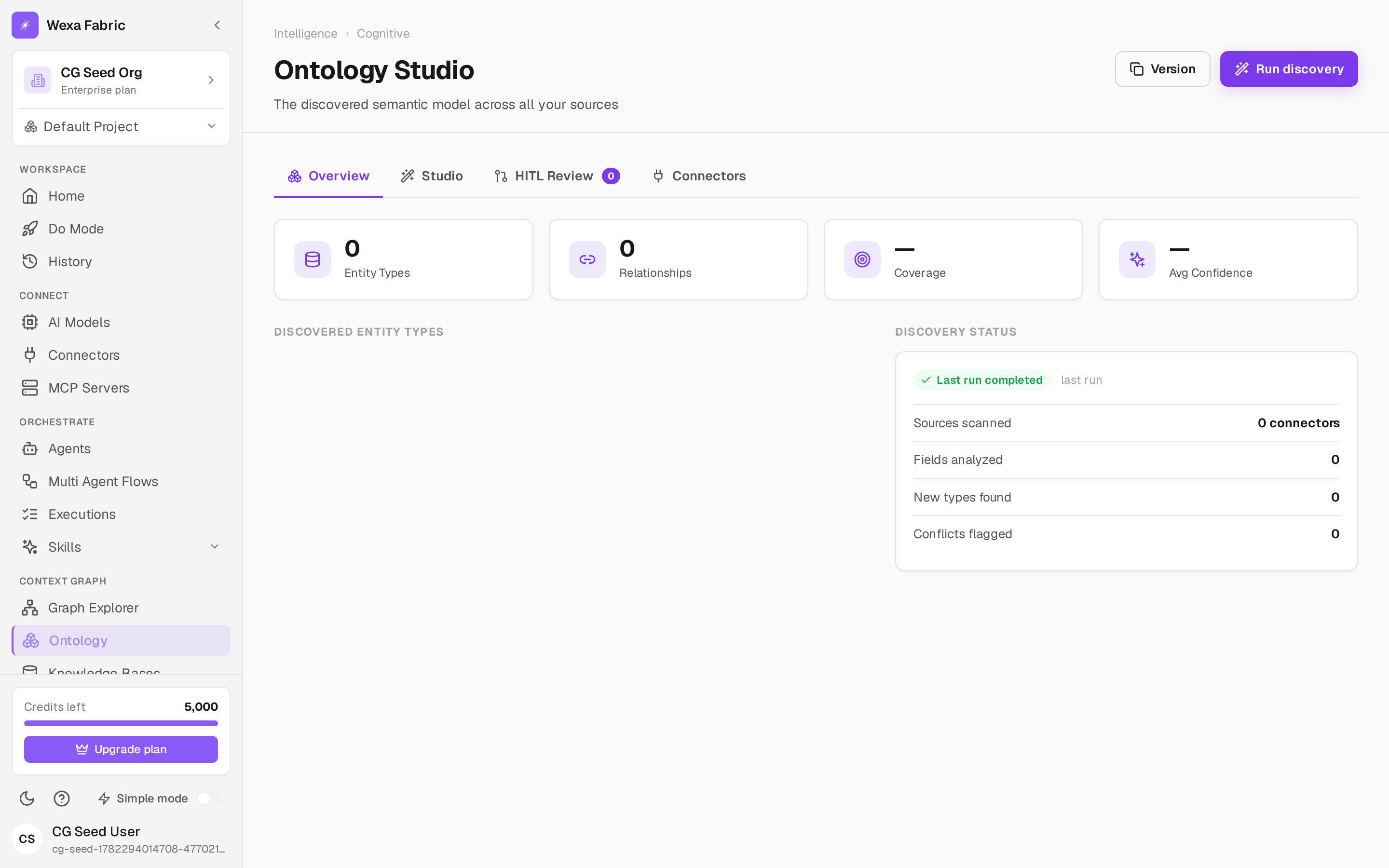
Overview
Section titled “Overview”The Overview tab summarizes the discovered model at a glance:
| Metric | What it shows |
|---|---|
| Entity Types | How many entity types have been discovered. |
| Relationships | How many relationship types connect them. |
| Coverage | How much of your data the model accounts for. |
| Avg Confidence | The model’s average confidence in its mappings. |
A Discovery status panel reports the last run — sources scanned, fields analyzed, new types found, and conflicts flagged.
Run discovery
Section titled “Run discovery”Click Run discovery (top-right) to (re)scan your connected sources and update the discovered model. As connectors sync new data, Fabric extends the ontology automatically; running discovery on demand refreshes it immediately.
| Tab | What it’s for |
|---|---|
| Overview | The summary above. |
| Studio | Explore and edit the discovered entity and relationship types. |
| HITL Review | The human-in-the-loop queue — low-confidence or conflicting mappings that need a person to accept, edit, or re-map. The badge shows how many are waiting. |
| Connectors | Which sources feed the model. |
Human review (HITL)
Section titled “Human review (HITL)”Mappings the platform isn’t confident about — or that conflict with the existing model — are routed to HITL Review rather than being silently accepted. This is what keeps the semantic layer both automatic and trustworthy: discovery does the heavy lifting, and a person resolves only the ambiguous cases. Schema drift in source systems is detected continuously and routed to the same queue.
How this connects to the rest of Fabric
Section titled “How this connects to the rest of Fabric”The committed ontology is what the context graph explorer and every agent query reason over. In Simple mode the ontology self-organizes automatically; in Advanced mode, changes are reviewed and committed explicitly.
Related
Section titled “Related”- Simple vs Advanced mode
- Context graph explorer
- Connect a connector — sync sources so discovery has data.