
Quickstart: connect an agent
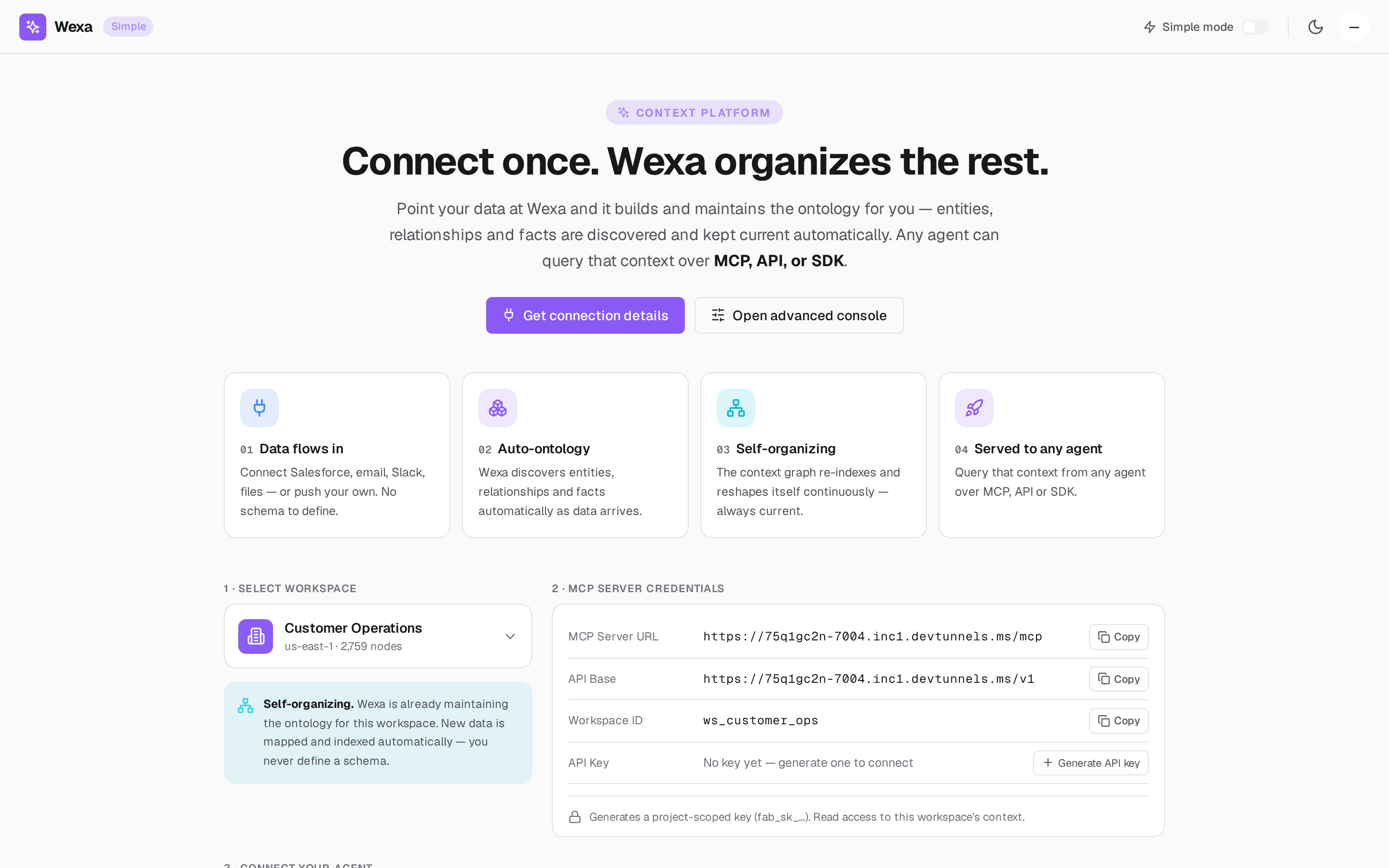
This quickstart connects an agent to your Fabric workspace so it can query your live, self-organizing context — over MCP, REST, or an SDK. The whole flow lives on one page in the console: Simple Mode.
Before you begin
Section titled “Before you begin”- Access to a Wexa Fabric workspace (a project you can reach). If you don’t have one, ask your Fabric administrator to grant you access — see Workspaces & scope.
- An MCP-capable client (Claude.ai, Claude Desktop, Cursor, ChatGPT) or any HTTP client / your own code.
1. Open Simple Mode
Section titled “1. Open Simple Mode”Sign in to the console and open Simple Mode (the streamlined connect-and-go surface). It has three steps: select a workspace, get credentials, connect your agent.
2. Select your workspace
Section titled “2. Select your workspace”Pick the workspace your agent should reason over. The workspace ID becomes the scope your
credentials are pinned to — it looks like ws_<your_project>.
3. Generate an API key
Section titled “3. Generate an API key”In the MCP server credentials card, click Generate API key. Fabric mints a
project-scoped key of the form fab_sk_….
You now have everything you need to connect:
| Field | Example value |
|---|---|
| MCP Server URL | https://mcp.wexa.ai/v1/sse |
| API Base | https://api.wexa.ai/v1 |
| Workspace ID | ws_<your_project> |
| Workspace header | X-Wexa-Workspace |
| API Key | fab_sk_… (generated above) |
Your actual URLs come from your deployment. The console reads them from the gateway’s
GET /v1/connection-infoand shows the values for your install — use those, not the examples above. See Get your connection details.
4. Connect your agent
Section titled “4. Connect your agent”Choose your path:
- MCP (recommended) — install Fabric as a remote MCP server in your agent. See the per-client guides: Claude, Cursor, ChatGPT, or any other MCP client.
- REST — call the Context API directly from any backend. See Use the REST API.
- SDK — use the official client for your language. See Python or TypeScript / Node.
The fastest path (MCP)
Section titled “The fastest path (MCP)”Paste this into your MCP client’s config, drop in your API key and workspace ID, and restart the client:
{ "mcpServers": { "wexa-context": { "url": "https://mcp.wexa.ai/v1/sse", "headers": { "Authorization": "Bearer <YOUR_API_KEY>", "X-Wexa-Workspace": "ws_<your_project>" } } }}Your agent now has live, auto-organized context — nothing to sync.
5. Try your first query
Section titled “5. Try your first query”Ask your agent something that depends on your data, for example:
“What are the top accounts at churn risk?”
Behind the scenes the agent calls Fabric’s query-context tool, which traverses your
context graph, returns the relevant entities and relationships, and records the call in
the audit log. See Your first context query for the REST and
SDK equivalents.
Next steps
Section titled “Next steps”- Connect Fabric as an MCP server — the full integration guide.
- The Fabric MCP tools — what your agent can call.
- Authentication & scopes — API keys vs OAuth 2.1.